SVG to G-code: convert vector files into CNC toolpaths online
Design Swiftly converts SVG files into G-code in the browser. An imported SVG becomes editable vector paths; you assign a cut to each path, check the toolpath in a 3D simulation, and export a G-code file for GRBL, LinuxCNC, Mach3 or Marlin.
Updated by the Design Swiftly team
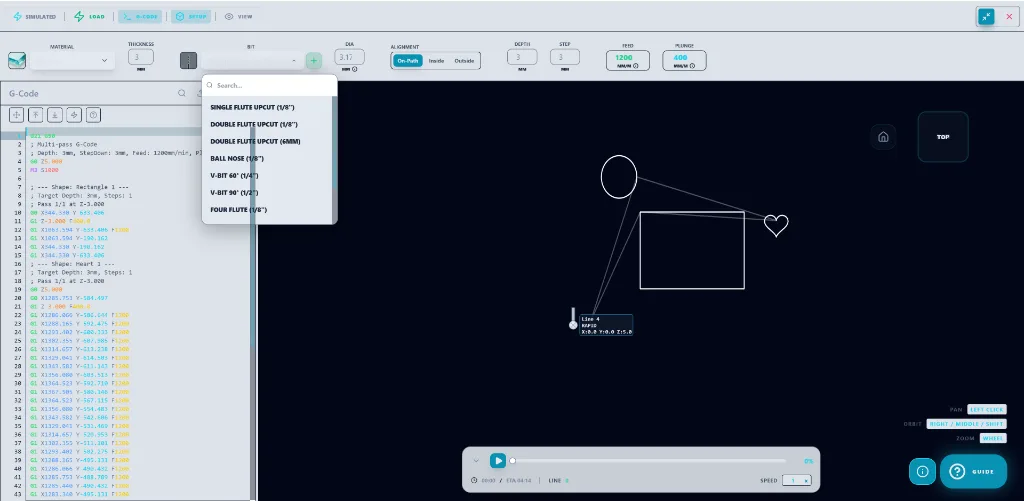
SVG to G-code at a glance
- SVG files import as editable paths, or as a flat image if you prefer.
- Cuts: profile inside, outside or on the line; pocket by raster or spiral; drill with optional peck; multi-pass depth by step-down.
- Post-processors: GRBL (.nc), LinuxCNC, Mach3 (.tap) and Marlin; the default download is a .gcode file.
- Units: mm, cm, m, inch and ft in the editor; G-code in mm (G21) or inches (G20).
- SVG import and export are in every plan, including Free.
How to convert an SVG to G-code
- Import the SVG. Open the editor and import the SVG file as paths.
- Check scale and units. Confirm the design size in mm or inches against your stock.
- Assign cuts. Pick inside, outside or on-line for outlines, a pocket for areas to clear, and drill for holes.
- Set the tool. Choose the bit, cut depth, step-down and feed rate.
- Simulate and export. Watch the 3D toolpath simulation, then download the G-code for your controller.
Preparing an SVG for CNC
Closed paths make clean profiles and pockets; open paths are best cut on the line. Text should be converted to paths before export from another editor, or typed directly in Design Swiftly, which turns text into paths itself.
Inside and outside profiles offset the cut by the bit radius so the finished part keeps the size you drew.
Frequently asked questions
Is there a free SVG to G-code converter?
Yes. The Design Swiftly Free plan includes SVG import and inside, outside and on-path cuts, with 5 G-code exports a day.
Can I edit the SVG after importing it?
Yes. Imported SVG shapes are normal editable paths: you can move nodes, scale, combine with boolean operations and add text.
Does it work with GRBL?
The GRBL post-processor writes standard GRBL G-code as .nc files. It is tested on our own GRBL 1.1 router; on other machines run an air cut first.
Convert your SVG to G-code
Design Swiftly runs in the browser. The Free plan needs no install; see pricing for what Pro and Studio add.
Open Design Swiftly