GRBL control software that runs in your browser
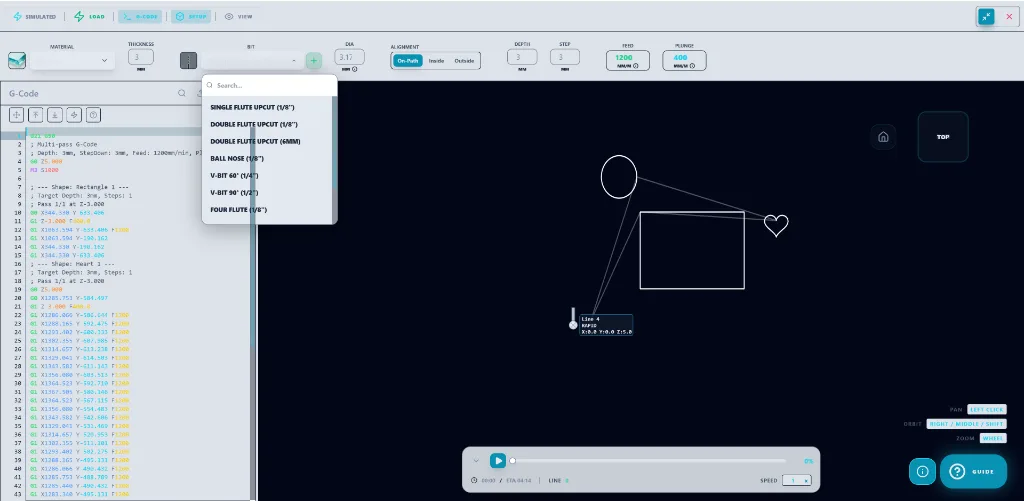
Design Swiftly machine control is built for GRBL 1.1 controllers and runs in the browser. Using the Web Serial API in Chrome or Edge on a desktop computer, it connects over USB, streams G-code line by line, jogs the axes and edits the GRBL $$ settings, with no separate sender program.
Updated by the Design Swiftly team
Built for GRBL 1.1 controllers and tested on our own GRBL 1.1 router. Other GRBL machines may work, but they are not tested: run an air cut first.
GRBL features
- USB connection through the Web Serial API at 115200 baud.
- Line-by-line G-code streaming, jogging, homing and probing.
- GRBL $$ settings editor, including steps per mm, maximum feed and acceleration.
- Zero all axes, soft reset, feed hold and emergency stop.
- Browser support: Chrome or Edge on a desktop computer; Firefox and Safari do not offer Web Serial.
- Machine control is in the Studio plan, according to the pricing page.
How to connect a GRBL machine
- Use Chrome or Edge. Open Design Swiftly in Chrome or Edge on a desktop computer.
- Plug in the USB cable. Connect the machine controller to the computer.
- Connect. Choose connect, pick the serial port in the browser prompt, and wait for the GRBL greeting.
- Home and zero. Home the machine, jog to the work origin and zero the axes.
- Stream the job. Start the G-code stream and keep feed hold and emergency stop within reach.
Which machines use GRBL
Many hobby CNC routers and engravers run GRBL 1.1 on an Arduino-class controller board. Design Swiftly is developed and tested on our own GRBL 1.1 router. It should work with other GRBL 1.1 machines, but it is not tested on every machine, so run an air cut first. If your machine replies to $$ with a list of settings, it speaks GRBL.
Frequently asked questions
Can I control a CNC machine from a web browser?
Yes, if the machine has a GRBL 1.1 controller and you use a browser that supports Web Serial: Chrome or Edge on a desktop computer. It is tested on our own GRBL 1.1 router; other GRBL machines may work, so run an air cut first.
Does it work on a phone or tablet?
Designing and simulating work on mobile browsers; machine control does not, because mobile browsers do not offer Web Serial.
Does it support FluidNC or Marlin machine control?
Live machine control is built for GRBL 1.1 and is not tested with FluidNC or Marlin boards. G-code files can also be written for LinuxCNC, Mach3 and Marlin to run with their own senders; those outputs are not tested on a machine.
Connect your GRBL machine
Design Swiftly runs in the browser. The Free plan needs no install; see pricing for what Pro and Studio add.
Open Design Swiftly